How I Built an AI Agent That Manages My Entire Life from Telegram
A behind-the-scenes breakdown of the personal AI assistant I built on n8n — one agent that handles my email, calendar, research, and daily briefings, all from a single Telegram chat.
Insights
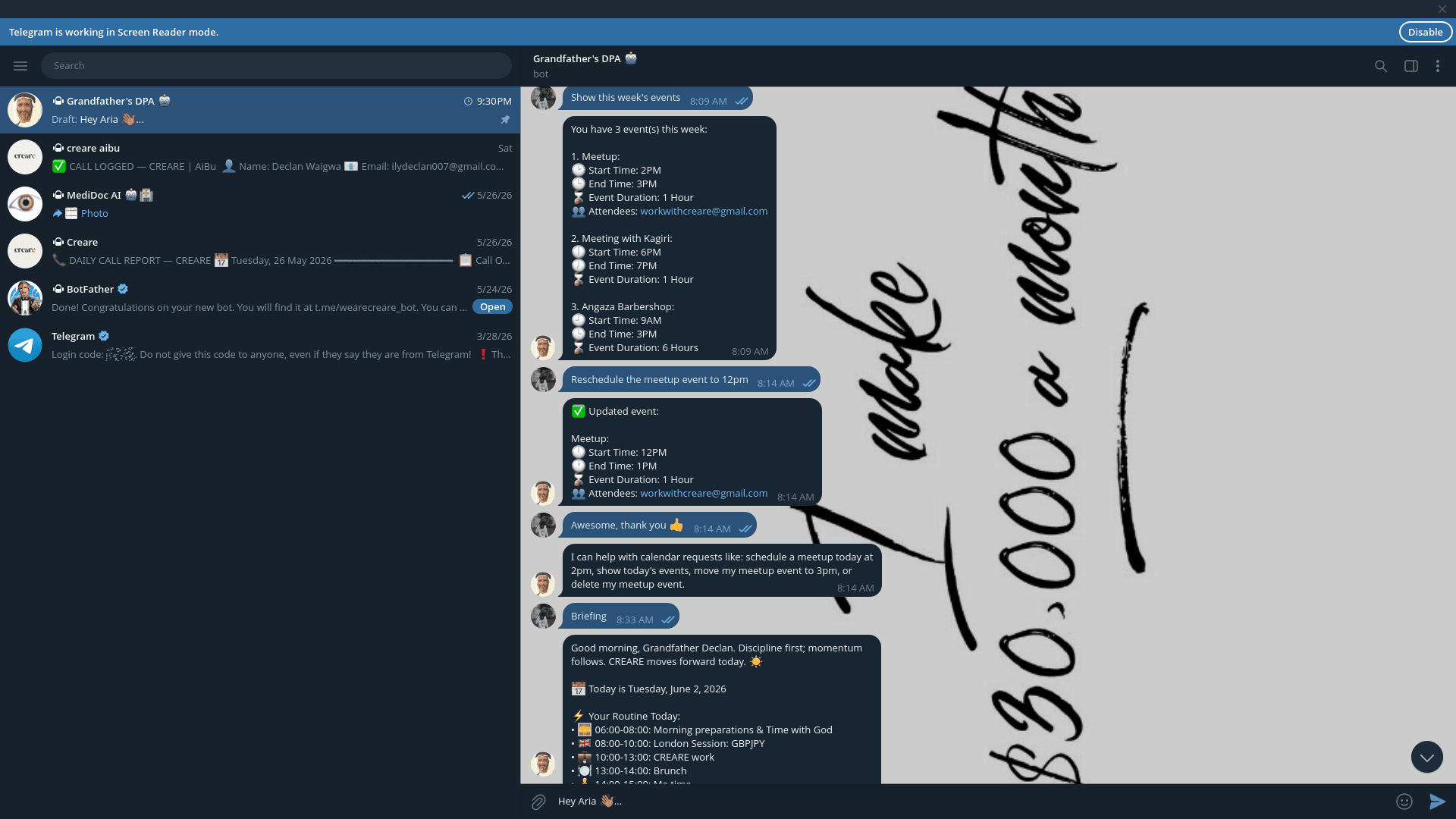
1. The Problem: Too Many Tools, Too Much Noise
Before I built this agent, my daily operations were scattered across Gmail, Google Calendar, various research tabs, and a dozen reminder apps. Every morning felt like starting a fire instead of running a system. I needed one command centre — and I decided to build it myself using n8n and Telegram.

2. How the Agent Works
The agent lives inside n8n and is triggered via Telegram. When I send a message, it routes my intent to the right sub-agent — email, calendar, research, or task management. Each sub-agent has its own set of tools and API connections. The whole system is orchestrated so that I never need to leave Telegram to get anything done.
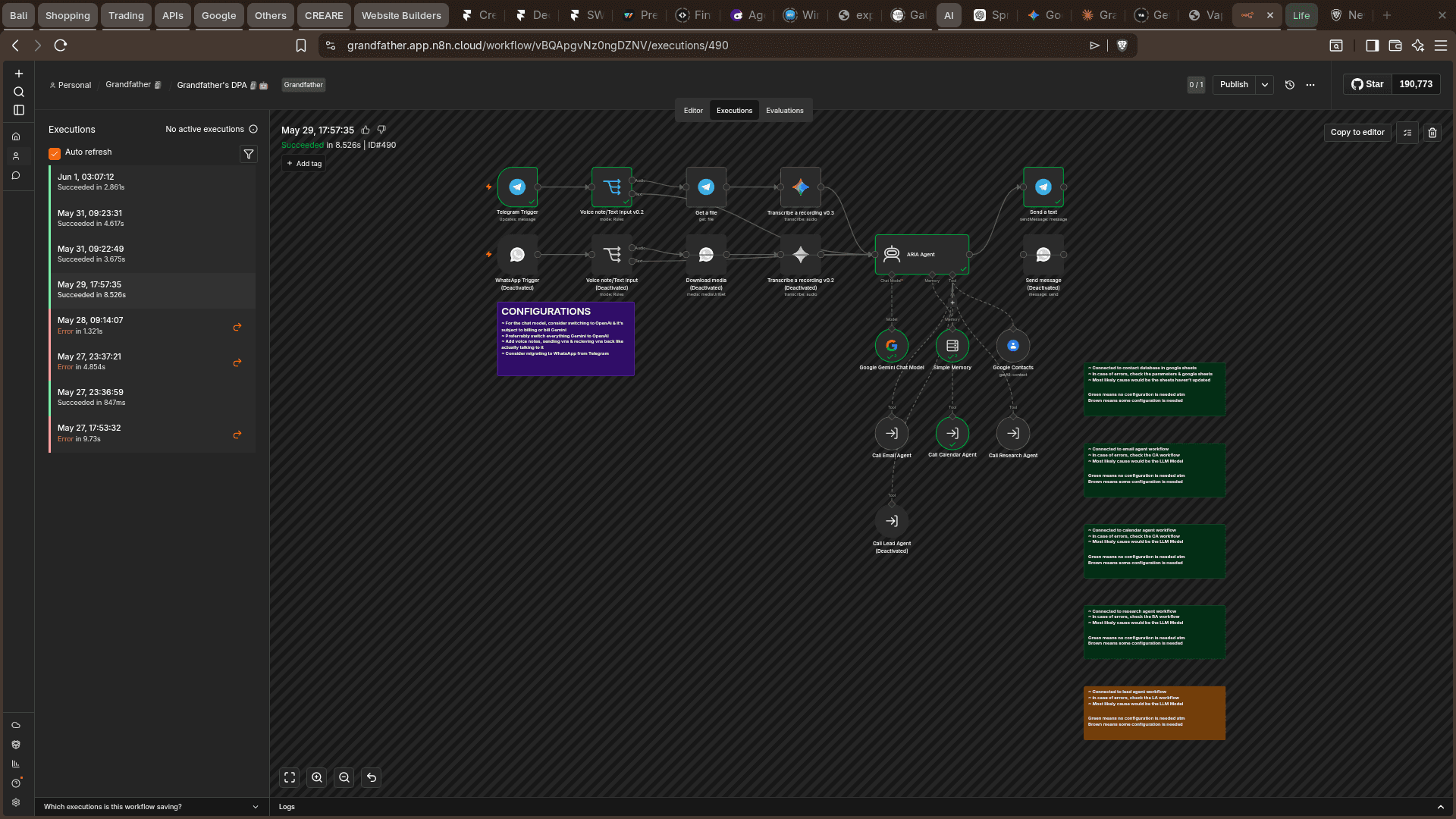
3. The Sub-Agents: What Each One Does
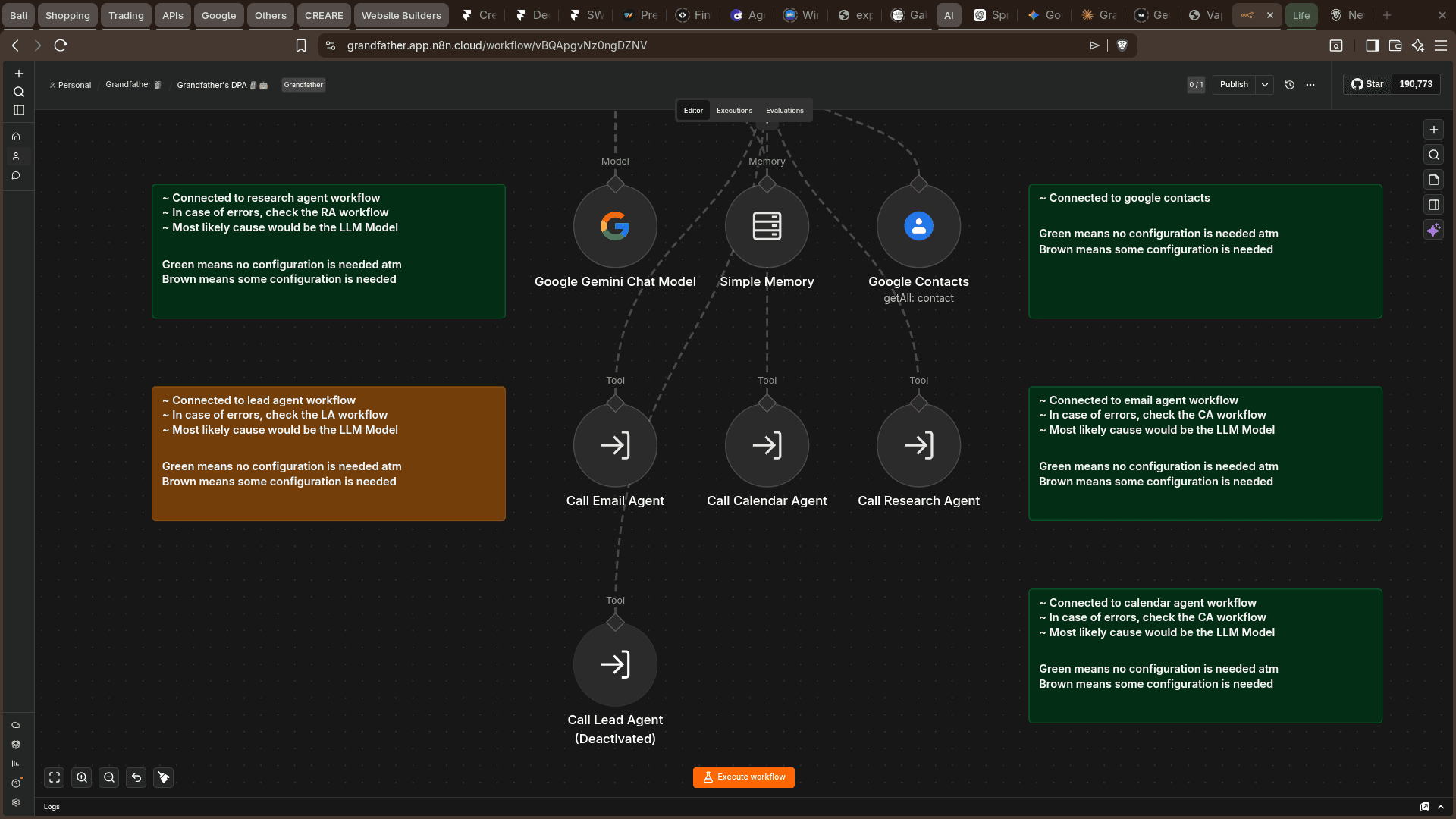
The system has four active sub-agents: an Email Agent that reads, writes, and sends emails in a professional tone and flags urgent messages immediately; a Calendar Agent that creates, updates, and deletes events and manages attendees; a Research Agent that handles any query requiring web research; and a Morning Briefing Agent that sends a structured 6am daily summary of pending tasks, new emails, and calendar events. Together they cover 90% of my daily admin.

4. What I Learned Building This
The biggest insight was that AI agents aren't magic — they're architecture. The quality of the system depends entirely on how well you define the routing logic, the prompts, and the failure handling. I also learned that n8n's visual builder makes complex orchestration accessible without sacrificing power. If you're thinking about building your own assistant, start with one sub-agent, get it working perfectly, then expand.

More to Discover


How I Built an AI Agent That Manages My Entire Life from Telegram
A behind-the-scenes breakdown of the personal AI assistant I built on n8n — one agent that handles my email, calendar, research, and daily briefings, all from a single Telegram chat.
Insights
1. The Problem: Too Many Tools, Too Much Noise
Before I built this agent, my daily operations were scattered across Gmail, Google Calendar, various research tabs, and a dozen reminder apps. Every morning felt like starting a fire instead of running a system. I needed one command centre — and I decided to build it myself using n8n and Telegram.
2. How the Agent Works
The agent lives inside n8n and is triggered via Telegram. When I send a message, it routes my intent to the right sub-agent — email, calendar, research, or task management. Each sub-agent has its own set of tools and API connections. The whole system is orchestrated so that I never need to leave Telegram to get anything done.
3. The Sub-Agents: What Each One Does
The system has four active sub-agents: an Email Agent that reads, writes, and sends emails in a professional tone and flags urgent messages immediately; a Calendar Agent that creates, updates, and deletes events and manages attendees; a Research Agent that handles any query requiring web research; and a Morning Briefing Agent that sends a structured 6am daily summary of pending tasks, new emails, and calendar events. Together they cover 90% of my daily admin.
4. What I Learned Building This
The biggest insight was that AI agents aren't magic — they're architecture. The quality of the system depends entirely on how well you define the routing logic, the prompts, and the failure handling. I also learned that n8n's visual builder makes complex orchestration accessible without sacrificing power. If you're thinking about building your own assistant, start with one sub-agent, get it working perfectly, then expand.
More to Discover
How I Built an AI Agent That Manages My Entire Life from Telegram
A behind-the-scenes breakdown of the personal AI assistant I built on n8n — one agent that handles my email, calendar, research, and daily briefings, all from a single Telegram chat.
Insights
1. The Problem: Too Many Tools, Too Much Noise
Before I built this agent, my daily operations were scattered across Gmail, Google Calendar, various research tabs, and a dozen reminder apps. Every morning felt like starting a fire instead of running a system. I needed one command centre — and I decided to build it myself using n8n and Telegram.
2. How the Agent Works
The agent lives inside n8n and is triggered via Telegram. When I send a message, it routes my intent to the right sub-agent — email, calendar, research, or task management. Each sub-agent has its own set of tools and API connections. The whole system is orchestrated so that I never need to leave Telegram to get anything done.
3. The Sub-Agents: What Each One Does
The system has four active sub-agents: an Email Agent that reads, writes, and sends emails in a professional tone and flags urgent messages immediately; a Calendar Agent that creates, updates, and deletes events and manages attendees; a Research Agent that handles any query requiring web research; and a Morning Briefing Agent that sends a structured 6am daily summary of pending tasks, new emails, and calendar events. Together they cover 90% of my daily admin.
4. What I Learned Building This
The biggest insight was that AI agents aren't magic — they're architecture. The quality of the system depends entirely on how well you define the routing logic, the prompts, and the failure handling. I also learned that n8n's visual builder makes complex orchestration accessible without sacrificing power. If you're thinking about building your own assistant, start with one sub-agent, get it working perfectly, then expand.